
*View accurate shipping rates and availability






4 Items
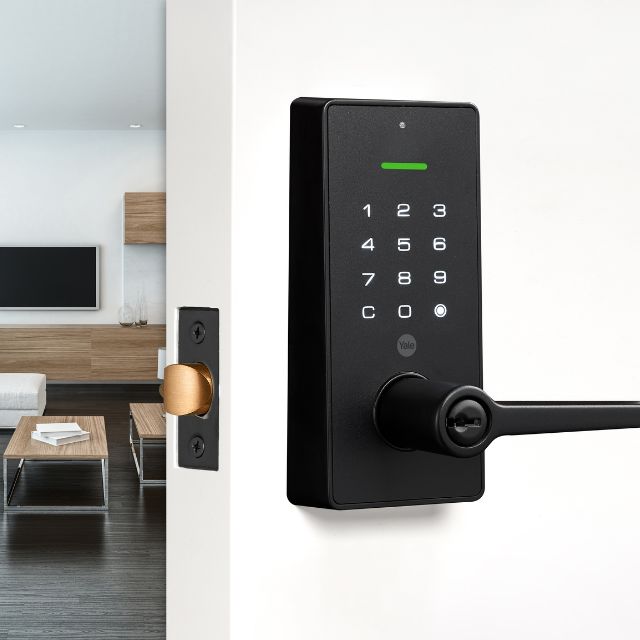
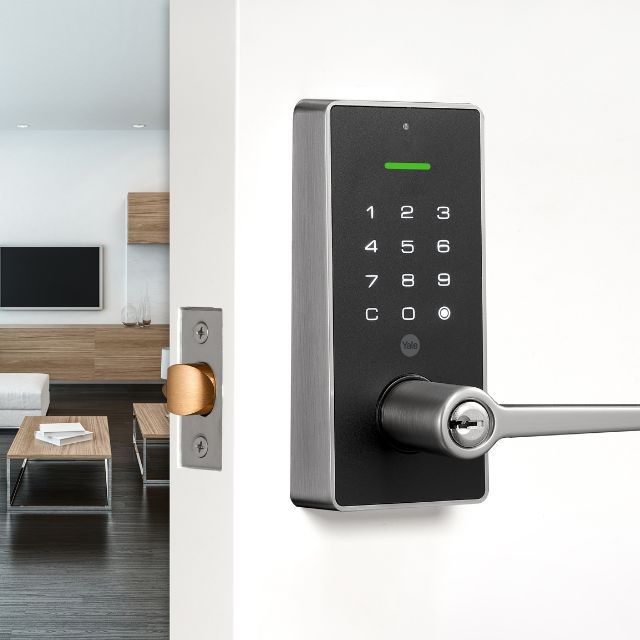
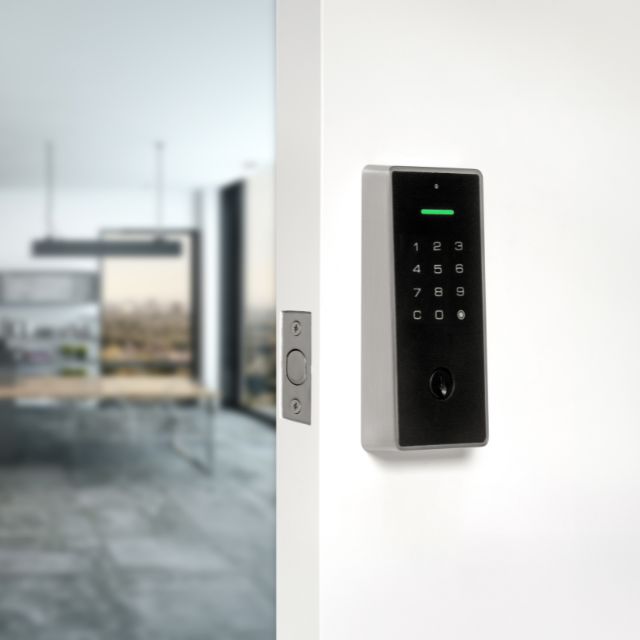
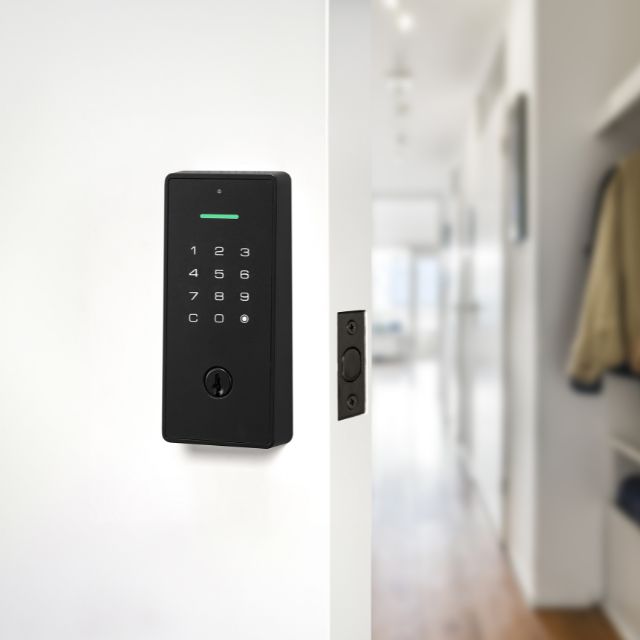
Yale Libi is a digital entry lock with a touchscreen keypad and a mechanical key. There are two pieces: a digital lever set and a digital deadbolt, each in matte black and satin nickel. They give keyless entry with a PIN code, and the key still works if the battery goes flat, so the door can always be opened.
People search for it as Yale Libi and Yale Libi digital lock. This page sets out how the lock works, what the measurements mean and how to fit and look after it. For the wider choice, see Yale door handles, digital door locks, smart door locks and entry door lock sets.
| Feature | Digital lever set | Digital deadbolt |
|---|---|---|
| Lock type | Latch with a lever handle | Deadbolt |
| Size of the unit | 147mm long, 138mm wide, 69.7mm projection | 148mm long, 71mm wide |
| Material | Zinc alloy | Zinc alloy |
| Finishes | Matte black, satin nickel | Matte black, satin nickel |
| Entry | Touchscreen PIN keypad and key | Touchscreen PIN keypad and key |
| Door thickness | 35mm to 45mm | 35mm to 45mm |
| Backset | Adjustable to 60mm or 70mm | Adjustable to 60mm or 70mm |
The outside of the door has a touchscreen keypad. Enter a PIN code and the lock releases. A simple tap on the keypad locks the door again. The keypad is backlit, and a proximity sensor wakes it as you approach, so the numbers light up when you reach the door at night. Inside, a mechanical body holds the lock and the strike, and a key cylinder on the outside takes a key as a back up. The lock works with PIN codes and keys, and no smartphone connection is needed.
Up to 70 unique PIN codes can be created, so each person in the household, and each regular visitor, can have their own code. Five one-time user codes are also available. A one-time code works once and then stops, which suits a delivery, a tradesperson or a guest who needs access for a single visit. The lock settings can be adjusted and personalised, and the user guide in the box sets out the steps.
| Who | Code type | Why |
|---|---|---|
| Each adult and teenager in the house | Their own PIN | Each person can be removed on their own if needed |
| A cleaner or a regular carer | A PIN | Works for every visit until you delete it |
| A tradesperson, a delivery or a guest | A one-time code | Works once, then expires |
| A short term renter | A PIN, then delete it | No key to collect or lose |
Auto-lock locks the door by itself after a set period of inactivity. It is useful when the last person out is carrying bags or children, and it removes the worry of whether the door was locked. The lock features can be adjusted, so the delay and the mode can be set to suit the household. If you often step out to the letter box and want the door to stay open, switch auto-lock off or set a longer delay.
The lock has a mechanical key override. It is a normal key cylinder, keyed C4, and the box holds two keys. If the battery goes flat, the key opens the door, so you cannot be locked out. Keep a spare key somewhere safe and away from the door, such as with a trusted neighbour or in a lock box away from the property. Do not hide a key near the door.
The lock is made to fit a standard 54mm bore hole, which is the large round hole drilled through the face of most entry doors. That makes it a quick replacement for an existing deadbolt, and no power tools are needed. It suits doors 35mm to 45mm thick, and the backset can be adjusted to 60mm or 70mm, which are the two common distances from the door edge to the centre of the hole. Measure these on your door before you order.
| Measure | Libi figure | How to check |
|---|---|---|
| Bore hole | 54mm | Measure the diameter of the large round hole in the door face |
| Door thickness | 35mm to 45mm | Tape across the door edge |
| Backset | 60mm or 70mm, adjustable | From the door edge to the centre of the bore hole |
Three measurements decide whether a handle set fits: the door thickness, the backset and the hole diameter. Measure the thickness of the door edge with a tape, then measure from the edge to the centre of the spindle hole, then measure the hole in the face of the door. If all three match the set, it drops into the existing preparation without drilling. If the old latch has a different backset, the lever will sit off centre on the door.
The lever set is a latch with a lever handle, so it opens and closes the door like a normal handle and adds the digital lock. The deadbolt is a bolt that throws into the frame and is used with a handle you already have. Choose the lever set if you want to replace the handle and the lock together. Choose the deadbolt if you want to keep your existing handle and add a digital bolt above it.
| If you want | Choose | Reason |
|---|---|---|
| To replace the handle and the lock in one go | Digital lever set | A handle with the keypad on the same unit |
| To keep a handle you like | Digital deadbolt | The bolt sits above the handle |
| A strong bolt on a front door | Digital deadbolt | The bolt throws into the frame |
| A single clean unit on a side door | Digital lever set | One piece instead of two |
The box holds the interior and exterior lock bodies, two keys, a strike plate, a mounting plate, the fixing screws, an installation template, a user guide and the installation instructions. The template is a paper guide to mark the door, which is helpful for a clean fit.
Mark the door with the template, check the backset and set the lock to 60mm or 70mm. Fit the mounting plate, then pass the lock bodies through the bore hole from each side, and join them with the fixing screws. Fit the strike plate to the frame so that the bolt or the latch meets it squarely. Insert the battery, set the first PIN code by following the user guide, and test every function with the door open before you close it. Test the key as well, so you know it works.
| Step | What to check |
|---|---|
| Template and backset | Marks line up; backset is set to the door |
| Mounting plate and lock bodies | Both sit flat on the door faces |
| Strike plate in the frame | The latch or bolt enters cleanly |
| First PIN and test | The keypad, the key and the auto-lock all work |
The backlit keypad and the proximity sensor are made for the moment you reach the door with your hands full. The keypad wakes as you approach, so the digits are visible without a torch, and you can enter the code with a knuckle. Enter the code, push the lever or turn the handle, and the door opens. When you leave, tap the keypad to lock, or leave the auto-lock to do it. There is no key to find in a bag, which is the biggest daily gain from a keypad lock.
A digital lock suits a house with several adults, a rental or a home with regular visitors. Each person gets a PIN, so no one has to share a key, and a code can be deleted when a person leaves. The 70 PIN codes and 5 one-time codes cover a large household and a stream of visitors. Keep a record of who holds which code, and review the list every few months. A lock that has been set up with care is a security gain, and one with a stale list of codes is not.
The Libi is made as a quick replacement for an existing deadbolt, on a standard 54mm bore. If the old deadbolt is a different hole size, the new lock will not seat, and the door may need a joiner. Remove the old lock and check the faces of the door for damage around the hole. Take a photo of the old lock before it comes out, and check that the door is still square and that the strike plate sits in good timber. If the old lock was loose, tighten the hinge screws before the new lock is fitted.
A digital lock runs on batteries, so check it as part of the household routine. Change the batteries on a schedule, not when they fail. If the keypad light dims or the lock is slow to respond, replace the batteries soon. Keep a spare set in a drawer. If the batteries go flat, use the key, replace the batteries and test the keypad before you shut the door.
Choose a PIN that is not a birth date, a street number or a simple run such as 1234. Change the code when a regular user leaves the household, and delete one-time codes if they are not used. Wipe the keypad now and then, because a worn or greasy pad can show the digits that are pressed most. Keep the door and frame in good order, since the strongest lock is only as strong as the door around it.
| Finish | Look | Suits |
|---|---|---|
| Matte black | Flat and dark | A black framed house, a timber door or a modern entry |
| Satin nickel | Soft grey metal with a low shine | A white or painted door and brushed metal fittings |
Wipe the keypad and the lever with a soft damp cloth and a little mild soap, and dry them. Avoid abrasive pads, strong cleaners and spray on the keypad. Wipe along the grain of a satin finish. Keep the keyway clear of dirt, and put a small amount of lock lubricant in it once a year.
Measure the bore hole, the door thickness and the backset. Decide between the lever set and the deadbolt, and choose the finish. Plan who will have codes, and where the spare key and the spare batteries will be kept.


